Posts

Docker Private Registery

Image
 Docker private registry Why we need pvt registry "Security, minimize internet load, speed, control We need to setup registry in three stage , stage one  simple stage two  secure (with ssl)  stage three with authentication Stage one: Step: create directories, need to create below directories a. Create a directory to store docker image b. create a certificate directory c. Auth directory Step :Run a docker registry container Create a container without volume with below command sudo  docker run -d -p 5000:5000 --name local-registry registry:2 below is screen shot check in browser:  tag the image, command to tag image sudo docker tag centos:7 127.0.0.1:5000/centos:7 Step Push image and check the browser again In ss centos is available, also in container it show as below  Stage two Step:  create a directory with the name of "docker-registry" then create two direcotries inside it  certs  data Step: then generate certificate inside certs direct...
 hi \i am  qayoom how r u
Installation of word press on linux. Step yum update
Image
Configure Apache with index,html and index.php Step1: Install Apache Step2:Check status Step 3 Check on browser.   Step4: Now set up Apache virtual host on Ubuntu keenable@isgec:~$ sudo mkdir -p /var/www/example.com/public_html Step5 Edit index.html in public_html folder,with following config. =========================== <!DOCTYPE html> <html lang= "en" dir= "ltr" > <head> <meta charset= "utf-8" > <title>Welcome to example.com</title> </head> <body> <h1>Success! example.com home page!</h1> </body> </html> =========================== Step6:create virtual host keenable@isgec:/etc/apache2/sites-available$ sudo vim example.com.conf ============================ <VirtualHost *: 80 > ServerName example.com ServerAlias www.example.com ServerAdmin webmaster@example.com DocumentRoo...
Image
Create PPPOE(DSL) Connection on Linux I had faced lot of hurdle while setting pppoe connection on Ubuntu 18.4LTs. interesting thing is that not found any reliable link on google for that,here is step wise detail of setting dsl connection on Linux Prerequisites: ANI is my service provider Connection name is provide by ISP Username and password provided by ISP (ANI) IP and domain  also provide by ISP Step 1create connection name: keenable@xxx:~$ nmcli con edit type pppoe con-name ANI Step2: Add user name. nmcli> set pppoe.username aa0003@elixir Step3:nmcli> set pppoe.password  xxxxx step:Add service  nmcli> set pppoe.servicename ANI Step4:set ip in network>ani>setting Step5: check the user name and other detail.and edit In ipv4 we can provide ip and domain which provided by isp
Image
Colorful Linux Terminal I have created  a script to send report on daily basis,but management  want some of the line  colorful , As always believe "zaroorat aijad ki maa hai" so  I get tips of colorful terminal, following are the point. =================================== Color code in linux. Black 0 ; 30 Dark Gray 1 ; 30 Red 0 ; 31 Light Red 1 ; 31 Green 0 ; 32 Light Green 1 ; 32 Brown / Orange 0 ; 33 Yellow 1 ; 33 Blue 0 ; 34 Light Blue 1 ; 34 Purple 0 ; 35 Light Purple 1 ; 35 Cyan 0 ; 36 Light Cyan 1 ; 36 Light Gray 0 ; 37 White 1 ; 37 ==================================================== type of color sequence: 3/4 bit 8 bit 24 bit  ==================== Modes: color-mode 0 reset 1; lighter than normal 2; darker than normal  =============== text-mode 3; italic 4;...
 Docker Volume before going into docker volume lets clear docker file system first. The Docker File System A Docker image is a collection of read-only layers. When we launch a container from an image, Docker adds a read-write layer to the top of that stack of read-only layers. Docker calls this the "Union File System" . Any time a file is changed, Docker makes a copy of the file from the read-only layers up into the top read-write layer. This leaves the original (read-only) file unchanged.  When a container is deleted, that top read-write layer is lost. This means that any changes made after the container was launched are now gone. ====================================== What is docker volume A Docker volume keep outside the container, on the host machine. From the container, the volume use like a folder which we can use to store and retrieve data. It is simply a mount point to a directory on the host.  ====================================== Create docker volume Do...
Docker file component.  Docker file created with the name of "Docker-file"below are the component it is not necessary to write component in case sensitive,but we should writ in capital. Component. FROM LABEL RUN CMD EXPOSE ENV ADD or COPY ENTRYPOINT VOLUME USER WORKDIR ONBUILD                      
How to Recover deleted files in Linux I had delete a folder from linux,but it was an important folder,so I try hard to recovered and failed,but never quit to R & D about the concept,after I found some tool, We will recover deleted file and folder with lsof,but it not recover those file and folder deleted with -r,after lot of R & D i found some tool,below are the tool for recovery.   1.Test-disk utility 2.extundelete 3.scalpel 4.autopsy and most reliable of all these is 5.Foremost we can use them with the help of google,
Cron Job in Linux   I got very confused and got lot problem while running cron job,also not found proper structure on google so decide to writ my experience,below are step wise cron job. minute: * * * * * /etc/postfix/queuegraph-rrd.sh This script run every minute */5 * * * * /bin/bash /root/mailq.sh this script run every five minute #*/57 * * * * /bin/bash /root/iptables.sh this script run on 57 minute hour. 0 * * * * run at every hour  0 23 * * * /bin/bash /root/pflogsumm.sh this script run at 11 pm day 15 15 15 * * This will run at 3:15 on every 15 days 15 15 L * * This will run on 3:15 of every last day of month   10 0 1 * * /bin/bash /root/change_always_bcc.sh this script run at 12,10  am night 1st day of month month 15 15 15 11 *   This will run on November,15 at 3:15   Day of week 15 15 * * 1-6 this will run  from Monday to Saturday, at 3:15   
Image
Difference between IDE and Framework before differentiate IDE and Framework lets clear other concept first. Platform A Platform  is a hardware and software on which s software is develop or build For example,Windows,Mac,Linux BSD,vmware  etc Library   A library refers to code that provides functions that we can call from our own code to deal with common tasks.  API   Application programming interface,it is an interface between server and a client This term refers to the “face” of the library, SDK This is a complete kit of software development tools for a specific platform,kit include Libraries, APIs, IDE, Documentation, etc.eg android development tool kit IDE it is an application which is used to developing, compiling and debugging applications. eg Eclipse, Visual Studio, and Intel Ii Framework   A collection of different libraries and api which is reusable,it is a software or a tool eg, Hibernate, Struts and Spring ...
Image
TCP Sockets     TCP Socket is also called virtual port,are used in tcp and udp communication,hey are called 'virtual ports' because a single physical connector can serve multiple connections. Each side of a socket connection uses its own port number, which does not change during the life of that connection. IP ADDRESS + Port No = Socket
IP Tables Firewall in Linux IP Tables is a firewall that plays an essential role in network security for most Linux systems The packet filtering mechanism provided by iptables is organized into three different kinds of structures: tables, chains and targets ========>The default table is the filter table =======>The default policy is also a target. By default, all chains have a default policy of allowing packets. ======>A target decides the fate of a packet, such as allowing or rejecting it. =========================================== IP Table configuration tool: e.g., fwbuilder, bastille and ufw =================================== Ip table main file: /etc/sysconfig/iptables ==================================================== Tables There are  three tables.     Filter         Rules to modify the packets         This is the default and perhaps the most widely used table. It...
AWS Guide AWS Services and lists Following are the topic which need to cover while appearing for AWS different certification.I will try to discuss every topic in detail in future,these are the AWS services as well ,AWS ec2 and AWS s3 are the mostly used services of AWS.at end of this topic i have given AWS link which need to follow for further,reference. ======>Aws compute services============= 1.AWS elastic compute cloud(ec2) 2.AWS batch 3.AWS elastic container register y(ecr) 4.aws elastic container services(ecs) 5.AWS elastic beanstalk 6.AWS lambda 7.AWS sericesless application model(sam) ====>AWS storage services=========== 1.amazon s3 2.AWS block storage(ebs) 3.amazon file storage(efs) 4.amazon glacier 5.amazon snowball 6.amazon storage gateway =====>AWS db services====== 1.amazon aurora 2.amazon dynamo db 3.amazon elastic ache 4.amazon RDS 5.amazon Redshift =========>aws networking content delivery===== 1.amazon API gateway 2.amazon cloud front 3...
Image
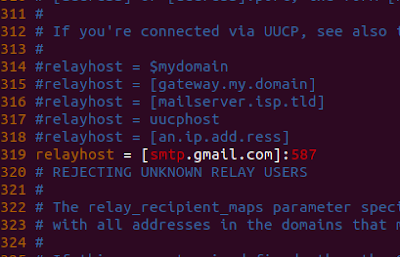
SSL on Post fix   I have given a task to relay post fix mail with g mail. I have post fix installed and working on y local system and delivering mail to my local user test1 and test2. Following is log for mail delivery . Feb 21 15:16:06 localhost postfix/smtpd[3149]: 102C4C42F9C: client=localhost[::1] Feb 21 15:16:23 localhost postfix/cleanup[3153]: 102C4C42F9C: message-id=<20190221094606.102C4C42F9C@mail.example.com> Feb 21 15:16:23 localhost postfix/qmgr[3141]: 102C4C42F9C: from=<test1@example.com>, size=305, nrcpt=1 (queue active) Feb 21 15:16:23 localhost postfix/local[3154]: 102C4C42F9C: to=<test2@example.com>, orig_to=<test2>, relay=local, delay=24, delays=24/0.02/0/0.02, dsn=2.0.0, status=sent (delivered to maildir) Feb 21 15:16:23 localhost postfix/qmgr[3141]: 102C4C42F9C: removed Step :Now i am going to use gmail id as relay. For this first i create:tls policy file #vim /etc/postf...
Image
Open SSL On Apache Before installation my web pages look like this: Step:Now I am going to install ssl : # yum install mod_ssl Step:Then install open ssl: #yum install ope nssl Step:Generate a private key with 2048 bit encription: #openssl genrsa -out ca.key 2048 Step: Then generate the certificate signing request (CSR) by using the following command. # openssl req -new -key ca.key -out ca.csr Step:Generate a self-signed certificate of X509 type which remains active for 365 days . #openssl x509 -req -days 365 -in ca.csr -signkey ca.key -out ca.crt Step:After generating the certificates, copy the files to the necessary directory. # cp ca.crt /etc/pki/tls/certs # cp ca.ke # cp ca.csr /etc/pki/tls/private Step: Now edit the secure web server configuration file and add the below lines into bottom of file. # vim /etc/httpd/conf.d/ssl.conf       Step: check http configrat...